AlgemeenVoorwaardenPrivacyContact
 
Bijwerken
Antikythera Mechanism

Antikythera Mechanism

Uitgebracht: 2015-07-10
© Derwent Studios
Antikythera Mechanism - QR Code
Versie 5.0
4+
Download in de App Store
Versie 5.0
4+
Download in de App Store
Uitgebracht: 2015-07-10
© Derwent Studios

iPhone schermafdrukken

Schermafbeelding
Schermafbeelding
Schermafbeelding
Schermafbeelding
Schermafbeelding
Schermafbeelding
Schermafbeelding
Schermafbeelding
Schermafbeelding

iPad schermafdrukken

Schermafbeelding
Schermafbeelding
Schermafbeelding
Schermafbeelding
Schermafbeelding
Schermafbeelding
Schermafbeelding
Schermafbeelding
Schermafbeelding

Beschrijving

This is a full working simulation of the world's first computer: the Antikythera Mechanism, an ancient Greek device accidentally discovered a century ago on an extraordinary shipwreck.
Bringing the mechanism back to life, this special app allows the user to investigate in great detail how the ancients viewed the cosmos.
The crank input can be controlled by the point slider at the bottom, enabling clockwise and anti-clockwise motion at varying speeds. Use the swipe rotate and pinch zoom features to navigate in and around the mechanism. Another point slide is also available at the side for panning vertically. The Calendar dial can be rotated using the + - controls on the bottom left of the screen.
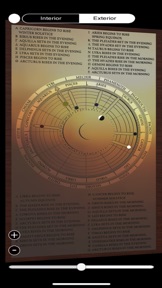
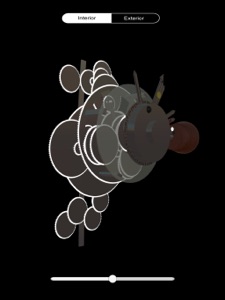
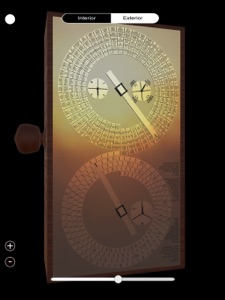
Two viewing modes are available for selection at the top; the external mode offers a detailed look at all the dials and the internal mode offers a close inspection of the gear arrangements which drive all eight outputs.
WARNING: Due to the high graphics requirements to run this app, please consider that this app only runs smoothly on the latest three generations of iPhone and only the latest two generations of iPad.

Wat is nieuw in versie 5.0

1) The app now incorporates within the mechanism the planet indicators of Mercury, Venus, Mars, Jupiter and Saturn along with the Sun and Moon indicators. The conjectural used gearing is based on the paper: 'The Cosmos in the Antikythera Mechanism' written by Tony Freeth and Alexander Jones, 2012.
2) Colour rendering has been addressed and the viewing of the inscriptions is improved.
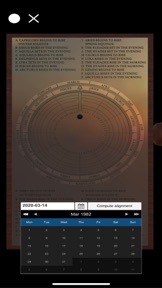
4) Top left button allows the user to select a date between 01/01/1900 and 01/01/2051 where the planetary alignments will be shown for that specific date.
5) Please note that app may not work on iPhones older than 3 generations and iPads older than 2 generations.

Verkoper

Naam

Derwent Studios Limited

URL

Informatie

Ontwikkelaar

Categorieën

Versie

5.0

Grootte

253,2 MB

Game Center

Nee

VPP Device Licensing

Ja

Beoordeling

Beoordeling: 4+

Compatibiliteit

iOS 9.0 of nieuwer

Apparaten

iPhone 4S, iPhone 5, iPhone 5c, iPhone 5s, iPhone 6, iPhone 6 Plus, iPhone 6s, iPhone 6s Plus, iPhone SE, iPhone 7, iPhone 7 Plus, iPhone 8, iPhone 8 Plus, iPhone X, iPhone XR, iPhone XS, iPhone XS Max, iPhone 11, iPhone 11 Pro, iPhone 11 Pro Max, iPhone SE (2e generatie), iPhone 12, iPhone 12 Pro, iPhone 12 Pro Max, iPhone 12 mini, iPhone 13, iPhone 13 Pro, iPhone 13 Pro Max, iPhone 13 mini, iPhone SE (3e generatie), iPhone 14, iPhone 14 Plus, iPhone 14 Pro, iPhone 14 Pro Max, iPhone 15, iPhone 15 Plus, iPhone 15 Pro, iPhone 15 Pro Max, iPhone 16, iPhone 16 Plus, iPhone 16 Pro, iPhone 16 Pro Max, iPhone 16e, iPhone 17, iPhone 17Pro, iPhone 17ProMax, iPhone Air, iPad 2 (Wi-Fi), iPad 2 (3G), iPad (3e generatie) (Wi-Fi), iPad (3e generatie) (4G), iPad (4e generatie) (Wi-Fi), iPad (4e generatie) (4G), iPad (5e generatie) Wi-Fi, iPad (5e generatie) Wi-Fi + Cellular, iPad (6e generatie) Wi-Fi, iPad (6e generatie) Wi-Fi + Cellular, iPad Pro, iPad Pro (Cellular), iPad Pro (9,7 inch), iPad Pro (9,7 inch) (Cellular), iPad Pro 12,9-inch (2e generatie), iPad Pro 12,9-inch (2e generatie) Wi-Fi + Cellular, iPad Pro (10,5-inch), iPad Pro (10,5-inch) Wi-Fi + Cellular, iPad Pro (11-inch), iPad Pro (11-inch) Wi-Fi + Cellular, iPad Pro 12,9-inch (3e generatie), iPad Pro 12,9-inch (3e generatie) Wi-Fi + Cellular, iPad Air, iPad Air (Cellular), iPad Air 2, iPad Air 2 (Cellular), iPad Air (derde generatie), iPad Air (derde generatie) Wi-Fi + Cellular, iPad mini (Wi-Fi), iPad mini (4G), iPad mini Retina, iPad mini Retina (Cellular), iPad mini 3, iPad mini 3 (Cellular), iPad mini 4, iPad mini 4 (Cellular), iPad mini (5e generatie), iPad mini (5e generatie) Wi-Fi + Cellular, iPad (7e generatie) Wi-Fi + Cellular, iPad Pro 11-inch (2e generatie), iPad Pro 11-inch (2e generatie) Wi-Fi + Cellular, iPad Pro 12,9-inch (4e generatie), iPad Pro 12,9-inch (4e generatie) Wi-Fi + Cellular, iPad Air (4e generatie) (Wi-Fi), iPad Air (4e generatie) (Wi-Fi + Cellular), iPad (8e generatie) Wi-Fi, iPad (8e generatie) Wi-Fi + Cellular, iPad Pro 11-inch (3e generatie), iPad Pro 11-inch (3e generatie) Wi-Fi + Cellular, iPad Pro 12,9-inch (5e generatie), iPad Pro 12,9-inch (5e generatie) Wi-Fi + Cellular, iPad (9e generatie), iPad (9e generatie) Wi-Fi + Cellular, iPad mini (6e generatie), iPad mini (6e generatie) Wi-Fi + Cellular, iPad Air (5e generatie), iPad Air (5e generatie) Wi-Fi + Cellular, iPad Pro 11-inch (4e generatie), iPad Pro 11-inch (4e generatie) Wi-Fi + Cellular, iPad Pro 12,9-inch (6e generatie), iPad Pro 12,9-inch (6e generatie) Wi-Fi + Cellular, iPad (10e generatie), iPad (10e generatie) Wi-Fi + Cellular, iPad Air 11-inch (M2) Wi-Fi, iPad Air 13-inch (M2) Wi-Fi, iPad Air 13-inch (M2) Wi-Fi + Cellular, iPad Pro 11-inch (M4) Wi-Fi, iPad Pro 11-inch (M4) Wi-Fi + Cellular, iPad Pro 13-inch (M4) Wi-Fi, iPad Pro 13-inch (M4) Wi-Fi + Cellular, iPad mini (A17 Pro) Wi-Fi, iPad mini (A17 Pro) Wi-Fi + Cellular, iPad (A16) Wi-Fi, iPad (A16) Wi-Fi + Cellular, iPad Air 11-inch (M3) Wi-Fi, iPad Air 11-inch (M3) Wi-Fi + Cellular, iPad Air 13-inch (M3) Wi-Fi, iPad Air 13-inch (M3) Wi-Fi + Cellular, iPod touch (vijfde generatie), iPod touch (zesde generatie), iPod touch (7e generatie)

Talen

Engels

App Store: Klantbeoordeling

Beoordelingen en recensies

4,0 van 5 (2 beoordelingen)

App Store: Recensies van klanten

2017-03-18

Great!

Could you please make a "pause" button to stop the machine directly? Also make the sliders for turning the gears BIGGER. The current sliders react poorly on my iPhone SE . Also make a button to go directly to "now" as in current date. Awsome app anyway! Cheers!
Little Rocket Studios
Versie 3.0
2016-01-19

Kan duidelijker.

Deze app is grafisch werkelijk schitterend gemaakt. Je kunt van het uurwerk van binnen en van buiten bekijken, de voorstelling verticaal kantelen en inzoomen op de onderdelen die je beter wilt zien. Maar het zal je niet gauw lukken om de werking van het mechanisme te doorgronden. In de eerste plaats komt dat doordat de raderen niet doorzichtig zijn, waardoor de voorstelling van een rad al gauw afgedekt wordt door dat van een ander. Verder is het onmogelijk om te zien welke assen meervoudig samengesteld zijn uitgevoerd. Daardoor is met name de uitwerking van het differentieel niet te volgen. Het zou werkelijk een verbetering zijn als iedere as plus bijbehorend rad haar eigen kleur kreeg.
De ondersteunende website is nog niet in de lucht. Voor documentatie ben je voorlopig aangewezen op de Engelse Wikipedia, die de meeste vragen beantwoordt en een verklaring biedt van de Griekse teksten op de behuizing.
jdcl!
Versie 2.0