Bijwerken


iPhone schermafdrukken



iPad schermafdrukken


Beschrijving
ConcertinaXL is an easy to play, authentic sounding virtual Anglo Concertina in the most popular key of C/G and may be transposed +/- one octave in semitone increments.
It is played using the exact same fingerings as the real instrument.
The layout is based on a common modern variant of the standard Jeffries layout, with three C# notes on the first two buttons of the right side top row.
The Anglo Concertina is commonly used for playing traditional Irish dance tunes, and is a much-favored instrument in County Clare, Ireland.
The instrument is bisonoric, meaning the instrument plays a different note for each button depending on whether you are pushing or pulling on the bellows.
A C/G tuned instrument has the middle row in the key of C on the press, and the bottom row in the key of G on the press. The top row consists of the accidentals missing from the other two rows and alternate direction notes for notes on the other rows.
ConcertinaXL is the perfect app for someone interested in the Anglo Concertina to have an experience of playing the instrument and become familiar with the button layout without the expense of purchasing a real concertina.
For experienced players, it can serve as a practice aid when it might be impractical to play the real instrument.
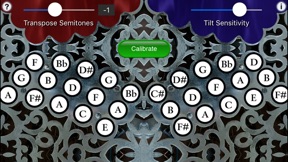
In the app, to play, place your iPhone or iPad on your leg and simply tip the device to the left for a bellows push note, or to the right for a bellows pull note, and press a button.
Since you may want to play chords with more than 3 or 4 fingers, you'll need to turn off "Multitasking Gestures" in your iPad's Settings, under General/Multitasking Gestures.
When the app first runs it will ask you to set the tilt center. Place your iPhone or iPad in the position you will be playing it and touch OK.
The Blue/Red display on the top of the screen shows which direction the bellows is moving. Blue on the left represents PUSH, Blue on the right represents PULL.
You may reverse the bellows while pushing a button simply by tipping in the opposite direction.
On the iPad, touch the diamond area at the center bottom of the screen for tremolo effects. The higher up on the diamond, the greater the effect.
Multiple buttons may be pressed at the same time to play chords.
Touch the "?" on the upper left corner to show/hide the button note names. The note names track the push/pull tilt.
Touch the "i" on the upper right corner to show/hide the tilt sensitivity, transposition, and calibration controls.
You may transpose the pitch up or down up to one octave in semitone increments.
Touch the number to the right of the transpose slider to reset the transpose to zero.
For a Bb/F concertina, set the transpose to -2, for an A/E, set the transpose to -3.
For a Bass Baritone concertina, one octave lower than a standard C/G instrument, set the transpose to -12.
When transposed, the note labels do not change, just the pitch produced.
Touch "Calibrate" to reset the home position for tilting.
All settings are saved when the app exits.
The button layout and spacing on the iPad screen exactly matches a real 30-button instrument.
Uses extremely high-quality per-button audio samples recorded from my personal concertina collection.
Please visit the app website for more information about playing the Anglo Concertina.
Wat is nieuw in versie 6.0
This app has been updated by Apple to display the Apple Watch app icon.
You may now transpose the pitch up or down up to one octave in semitone increments.
Touch the number to the right of the transpose slider to reset the transpose to zero.
For a Bb/F concertina, set the transpose to -2, for an A/E, set the transpose to -3.
For a Bass Baritone concertina, one octave lower than a standard C/G instrument, set the transpose to -12.
When transposed, the note labels do not change, just the pitch produced.
Verkoper
Naam
Michael Eskin
Informatie
Ontwikkelaar
Categorieën
Versie
6.0
Grootte
60,2 MB
Game Center
Nee
VPP Device Licensing
Ja
Beoordeling
Beoordeling: 4+
Compatibiliteit
iOS 10.0 of nieuwer
Apparaten
iPhone 5, iPhone 5c, iPhone 5s, iPhone 6, iPhone 6 Plus, iPhone 6s, iPhone 6s Plus, iPhone SE, iPhone 7, iPhone 7 Plus, iPhone 8, iPhone 8 Plus, iPhone X, iPhone XR, iPhone XS, iPhone XS Max, iPhone 11, iPhone 11 Pro, iPhone 11 Pro Max, iPhone SE (2e generatie), iPhone 12, iPhone 12 Pro, iPhone 12 Pro Max, iPhone 12 mini, iPhone 13, iPhone 13 Pro, iPhone 13 Pro Max, iPhone 13 mini, iPhone SE (3e generatie), iPhone 14, iPhone 14 Plus, iPhone 14 Pro, iPhone 14 Pro Max, iPhone 15, iPhone 15 Plus, iPhone 15 Pro, iPhone 15 Pro Max, iPhone 16, iPhone 16Plus, iPhone 16Pro, iPhone 16ProMax, iPhone 16e, iPad (4e generatie) (Wi-Fi), iPad (4e generatie) (4G), iPad (5e generatie) Wi-Fi, iPad (5e generatie) Wi-Fi + Cellular, iPad (6e generatie) Wi-Fi, iPad (6e generatie) Wi-Fi + Cellular, iPad Pro, iPad Pro (Cellular), iPad Pro (9,7 inch), iPad Pro (9,7 inch) (Cellular), iPad Pro 12,9-inch (2e generatie), iPad Pro 12,9-inch (2e generatie) Wi-Fi + Cellular, iPad Pro (10,5-inch), iPad Pro (10,5-inch) Wi-Fi + Cellular, iPad Pro (11-inch), iPad Pro (11-inch) Wi-Fi + Cellular, iPad Pro 12,9-inch (3e generatie), iPad Pro 12,9-inch (3e generatie) Wi-Fi + Cellular, iPad Air, iPad Air (Cellular), iPad Air 2, iPad Air 2 (Cellular), iPad Air (derde generatie), iPad Air (derde generatie) Wi-Fi + Cellular, iPad mini Retina, iPad mini Retina (Cellular), iPad mini 3, iPad mini 3 (Cellular), iPad mini 4, iPad mini 4 (Cellular), iPad mini (5e generatie), iPad mini (5e generatie) Wi-Fi + Cellular, iPad (7e generatie) Wi-Fi + Cellular, iPad Pro 11-inch (2e generatie), iPad Pro 11-inch (2e generatie) Wi-Fi + Cellular, iPad Pro 12,9-inch (4e generatie), iPad Pro 12,9-inch (4e generatie) Wi-Fi + Cellular, iPad Air (4e generatie) (Wi-Fi), iPad Air (4e generatie) (Wi-Fi + Cellular), iPad (8e generatie) Wi-Fi, iPad (8e generatie) Wi-Fi + Cellular, iPad Pro 11-inch (3e generatie), iPad Pro 11-inch (3e generatie) Wi-Fi + Cellular, iPad Pro 12,9-inch (5e generatie), iPad Pro 12,9-inch (5e generatie) Wi-Fi + Cellular, iPad (9e generatie), iPad (9e generatie) Wi-Fi + Cellular, iPad mini (6e generatie), iPad mini (6e generatie) Wi-Fi + Cellular, iPad Air (5e generatie), iPad Air (5e generatie) Wi-Fi + Cellular, iPad Pro 11-inch (4e generatie), iPad Pro 11-inch (4e generatie) Wi-Fi + Cellular, iPad Pro 12,9-inch (6e generatie), iPad Pro 12,9-inch (6e generatie) Wi-Fi + Cellular, iPad (10e generatie), iPad (10e generatie) Wi-Fi + Cellular, iPad Air 11-inch (M2) Wi-Fi, iPad Air 13-inch (M2) Wi-Fi, iPad Air 13-inch (M2) Wi-Fi + Cellular, iPad Pro 11-inch (M4) Wi-Fi, iPad Pro 11-inch (M4) Wi-Fi + Cellular, iPad Pro 13-inch (M4) Wi-Fi, iPad Pro 13-inch (M4) Wi-Fi + Cellular, iPad A16, iPad A16Cellular, iPad Air11M3, iPad Air11M3Cellular, iPad Air13M3, iPad Air13M3Cellular, iPad MiniA17Pro, iPad MiniA17ProCellular, iPod touch (zesde generatie), iPod touch (7e generatie), Apple Watch Series 4, Apple Watch Series 5, Apple Watch Series 6 (GPS), Apple Watch Series 6 (GPS + Cellular), Apple Watch Series SE (GPS), Apple Watch Series SE (GPS + Cellular), Apple Watch Series 7 (GPS), Apple Watch Series 7 (GPS + Cellular), Apple Watch Series 8 (GPS), Apple Watch Series 8 (GPS + Cellular), Apple Watch SE (2e generatie) (GPS), Apple Watch SE (2e generatie) (GPS + Cellular), Apple Watch Ultra, Apple Watch Series 9 (GPS), Apple Watch Series 9 (GPS + Cellular), Apple Watch Ultra 2, Watch10, Watch10Cellular
Talen
Engels
App Store: Klantbeoordeling
Beoordelingen en recensies
0,0 van 5 (Geen score)
App Store: Recensies van klanten
Geen item