Bijwerken


iPhone schermafdrukken



Beschrijving
* A Sketch of Benjamin Braddock(played by Dustin Hoffman) from "The Graduate"; done using Vermeer's Lens and a 2B pencil.
◉ Vermeer's Lens is no ordinary drawing app. It is a drawing app that helps you make real sketches on paper.
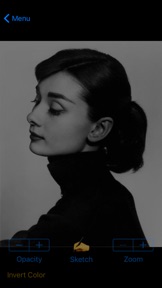
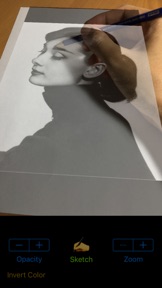
◉ Vermeer's Lens is an augmented reality drawing app that works like an AR projector. It projects any photo you've selected from your photo library on any paper or sketch books you prefer drawing on.
◉ Vermeer's Lens allows you to trace out the images you want to draw before shading. But it is more than a tracing tool, as it also allows you to capture areas of different tones and highlights - achieving a more lifelike picture.
◉ Vermeer's Lens is a great tool for portrait drawing.
◉ Vermeer's Lens can also be used in short drawing/sketching practices for beginners.
◉ Vermeer's Lens enables even beginners to make stunning drawings.
◉ Through its precise algorithms, what is traditionally difficult, such as portraits, can now be done without the need of construction lines.
◉ This app works on most phones without using Apple's ARKit which can only run on newer high performance chips. It's a simple effective tool for a simple hobby.
*** See "Developer's website" below for a video demo
*** A Youtube channel (see "Developer's website") is set up to provide you with examples of Vermeer's Lens in action. Content will be regularly uploaded so long as there are people interested in this app.
*** This app works on most phones without using Apple's ARKit which can only run on newer high performance chips. It is simple, reliable and stable.
________________________________________________________
How it works :
> a photo is chosen from your photo library and “projected” over the paper to draw on.
> This projection is achieved by imaging the paper on the phone screen, and overlaying the translucent photo onto it.
> With the phone held in a phone-holder, you can use its screen as a lens, through which you trace out the photo onto the paper.
> Phone can be tilted and rotated to the angle most comfortable to you, while "Vermeer’s Lens" transforms the photo to match the perspective of the paper.
> Not just the outlines, even the different subtle tones and contours of a face could be captured, to get that 3-D effect.
> Opacity of the overlaying photo could be adjusted to allow close comparison between your drawing and the photo.
> The overlaying photo responds to on-screen gesture: you could move, scale and rotate the photo during sketching.
> A zoom option allows you to zoom in on your drawing for delicate pencil work.
in addition :
> A Vermeer’s Lens channel is also created on youtube to provide our users with additional "instructions & tutorials"on the use of this app to create art (videos updated regularly).
This is linked directly to the app via the “Demo” button.
> You can email us for support/feedback directly via the “Contact Us” button on the main menu of the app. Or leave a message (go to the “about” tab) on our youtube channel (see “Developer’s website” below).
For more info and demo:
> See “Developer’s website” below
Wat is nieuw in versie 1.2.9
Bug fixes and performance improvements.
Verkoper
Naam
zhiyang law
Informatie
Ontwikkelaar
Categorieën
Versie
1.2.9
Grootte
15 MB
Game Center
Nee
VPP Device Licensing
Ja
Beoordeling
Beoordeling: 4+
Compatibiliteit
iOS 9.0 of nieuwer
Apparaten
iPhone 4S, iPhone 5, iPhone 5c, iPhone 5s, iPhone 6, iPhone 6 Plus, iPhone 6s, iPhone 6s Plus, iPhone SE, iPhone 7, iPhone 7 Plus, iPhone 8, iPhone 8 Plus, iPhone X, iPhone XR, iPhone XS, iPhone XS Max, iPhone 11, iPhone 11 Pro, iPhone 11 Pro Max, iPhone SE (2e generatie), iPhone 12, iPhone 12 Pro, iPhone 12 Pro Max, iPhone 12 mini, iPad 2 (Wi-Fi), iPad 2 (3G), iPad (3e generatie) (Wi-Fi), iPad (3e generatie) (4G), iPad (4e generatie) (Wi-Fi), iPad (4e generatie) (4G), iPad (5e generatie) Wi-Fi, iPad (5e generatie) Wi-Fi + Cellular, iPad (6e generatie) Wi-Fi, iPad (6e generatie) Wi-Fi + Cellular, iPad Pro, iPad Pro (Cellular), iPad Pro (9,7 inch), iPad Pro (9,7 inch) (Cellular), iPad Pro 12,9-inch (2e generatie), iPad Pro 12,9-inch (2e generatie) Wi-Fi + Cellular, iPad Pro (10,5-inch), iPad Pro (10,5-inch) Wi-Fi + Cellular, iPad Pro (11-inch), iPad Pro (11-inch) Wi-Fi + Cellular, iPad Pro 12,9-inch (3e generatie), iPad Pro 12,9-inch (3e generatie) Wi-Fi + Cellular, iPad Air, iPad Air (Cellular), iPad Air 2, iPad Air 2 (Cellular), iPad Air (derde generatie), iPad Air (derde generatie) Wi-Fi + Cellular, iPad mini (Wi-Fi), iPad mini (4G), iPad mini Retina, iPad mini Retina (Cellular), iPad mini 3, iPad mini 3 (Cellular), iPad mini 4, iPad mini 4 (Cellular), iPad mini (5e generatie), iPad mini (5e generatie) Wi-Fi + Cellular, iPad (7e generatie) Wi-Fi + Cellular, iPad Pro 11-inch (2e generatie), iPad Pro 11-inch (2e generatie) Wi-Fi + Cellular, iPad Pro 12,9-inch (4e generatie), iPad Pro 12,9-inch (4e generatie) Wi-Fi + Cellular, iPad Air (4e generatie) (Wi-Fi), iPad Air (4e generatie) (Wi-Fi + Cellular), iPad (8e generatie) Wi-Fi, iPad (8e generatie) Wi-Fi + Cellular, iPad Pro 11-inch (3e generatie), iPad Pro 11-inch (3e generatie) Wi-Fi + Cellular, iPad Pro 12,9-inch (5e generatie), iPad Pro 12,9-inch (5e generatie) Wi-Fi + Cellular, iPod touch (vijfde generatie), iPod touch (zesde generatie), iPod touch (7e generatie)
Talen
Engels
App Store: Klantbeoordeling
Beoordelingen en recensies
0,0 van 5 (Geen score)
App Store: Recensies van klanten
Geen item